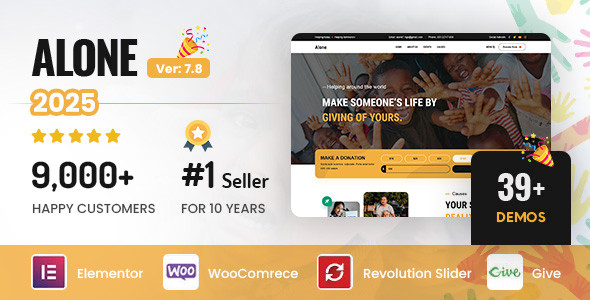
If you run a charity, nonprofit, NGO, or fundraising campaign, your website does a lot of heavy lifting. It needs to tell your story, build trust, collect donations, promote events, and stay usable on any device. That is a tall order, especially if you do not have a full-time web team.
Alone – Charity Multipurpose Non-profit WordPress Theme is built specifically for organizations like yours. It focuses on causes, campaigns, and community work, rather than on generic business features. It has been adopted by thousands of nonprofits and has logged over ten thousand sales, which gives you a sense of its reach and maturity.
This overview walks through what Alone offers, how it works in day-to-day use, where it shines, and what you should consider before choosing it for your site.
Alone brings together design flexibility, donation tools, event management, and eCommerce in a single WordPress theme. At a high level, you get:
The rest of this article dives deeper into how these pieces fit together in real use.
The first thing you notice with Alone is its design language. The theme keeps things clean and modern, with strong typography, clear sections, and plenty of white space. That style works well for causes that need to communicate serious information without distractions.
You can start from more than 30 demos tailored to different types of nonprofits and campaigns. These demos are “purpose-built,” so you are not just getting generic homepages. You see layouts for:
You can import these demos with one click. That matters if you have limited time, because it lets you move from a blank WordPress install to a fully structured site in minutes. From there, you customize with Elementor rather than designing from scratch.
The theme’s layouts are fully responsive and mobile-optimized. Given how many supporters now visit sites from phones, that responsiveness is not just a design nicety; it directly affects your ability to capture donations and signups.
Alone is built around Elementor, which means you build and edit pages visually. Instead of working with code, you drag and drop widgets onto the page, rearrange sections, and tweak settings in real time.
A crucial detail is that Alone requires Elementor Pro for full functionality. Many of its design and layout features depend on Pro-level widgets and capabilities. In practice, this means:
If your team is already comfortable with Elementor Pro, this is an advantage: you can reuse your existing knowledge and move quickly. If you are new to Elementor, you should account for a learning curve, though the visual interface helps non-technical users get up to speed.
For nonprofits, donation features are often the deciding factor, and Alone leans heavily into GiveWP (also referred to as Give Donation). This plugin powers the core fundraising workflows in the theme.
Alone’s integration with GiveWP means you can:
From a supporter’s point of view, the Ajax popups and focused donation sections keep the process quick and contained. Visitors do not feel like they are being shuttled around to entirely different pages; they can donate without losing context.
From your side, you can structure campaigns clearly, promote them on different pages, and adjust layouts in Elementor to match each campaign’s messaging.
Many nonprofits rely on events: fundraisers, galas, community outreach days, workshops, and more. Alone integrates with The Events Calendar to handle this side of your work.
With that integration, you can:
Because events sit alongside donation and content sections in the theme’s demos, you can build pages that combine multiple actions: donate, register for an event, and learn more about your cause in one place. That is a practical way to keep your supporters engaged and coming back.
If you sell merchandise, sponsorship packages, or other paid offerings, WooCommerce integration covers that piece.
Alone supports WooCommerce templates, which makes it possible to:
While WooCommerce is a full eCommerce system on its own, Alone gives you the theme-level styling and layout support to keep the shop pages visually consistent with your broader site.
Nonprofit sites often grow over time. You publish news, blog posts, impact stories, press releases, and project updates. If visitors cannot find that content, it loses value.
Alone includes Ajax search for posts, which improves content discovery. As users type, they can see results update without refreshing the page. This kind of search feels faster and encourages people to explore more of your work.
Combined with structured layouts, clear menus, and well-designed sections, the Ajax search helps supporters find answers on their own, which can reduce support requests and keep people on your site longer.
Visual identity matters for any organization. Alone gives you a broad set of tools to align the site with your brand:
With Elementor (and Elementor Pro), you can also adjust spacing, section layouts, and content blocks without touching code. If you have a designer on your team, they can push the theme further; if you do not, the demos provide solid defaults you can tweak.
Advanced Custom Fields (ACF), which is bundled with Alone, supports more structured content. You can define custom fields for things like project metadata, impact metrics, or staff profiles and then display them consistently across the site. That is especially helpful if you plan to maintain a more complex content model.
The theme is optimized for speed and SEO. In concrete terms, that means:
High performance helps you in three ways:
Of course, real-world performance will still depend on your hosting, plugin choices, and media optimization. But starting from a performance-focused theme gives you a strong base to work from.
If you operate across regions or serve multilingual communities, Alone’s multilingual and RTL features matter.
The theme is WPML-ready, meaning it works with the WPML plugin to create multilingual sites. You can publish content in multiple languages and let visitors switch between them, keeping the same structure and design.
It also supports RTL (right-to-left) layouts. That is crucial if you publish in languages like Arabic or Hebrew. RTL support ensures that layout directions, alignment, and typographic flow adjust properly instead of feeling like an afterthought.
One of the quoted notes in the theme’s description highlights an “Important Update” about purchase code verification. The developers resolved a verification issue and patched a related vulnerability, so purchase codes now verify smoothly when you activate the theme.
For you, this shows two things:
Alone is also described as being backed by a dedicated support team and regular updates. That is useful in a WordPress environment where plugins and the core platform change frequently. When your theme keeps pace, you are less likely to run into compatibility gaps or broken layouts over time.
If you need to get a site online fast—for example, a new campaign or an emergency appeal—the one-click demo import is a practical starting point. You can:
This workflow lets you shift your energy from “How do we build a layout?” to “What do we want to say?” That is valuable when staff time is limited.
For a small local charity, you might not use every integration at once. A typical setup could focus on:
You can keep the plugin stack lean but still benefit from responsive layouts, Ajax donation popups, and search. As your organization grows, you can enable more features like eCommerce or multilingual pages.
If you run a larger NGO with multiple programs or branches, Alone’s flexibility helps you handle more complex content. You can:
The Events Calendar and booking features help you coordinate larger event schedules. With WooCommerce in place, you can also handle merchandise or paid publications without using a separate system.
For ongoing campaigns, you can use Alone’s donation carousels and call-to-action sections to keep them visible across your site. A homepage might feature a rotating carousel of current appeals, while individual campaign pages provide deeper stories, images, and progress updates.
Event booking lets you attach real-world actions—like volunteer days or awareness workshops—to those campaigns. Visitors can read about the cause, sign up for an event, and donate, all within the same design system.
Some nonprofits mix donations, sponsorships, and a small shop. Alone’s integration with GiveWP and WooCommerce allows you to:
Because everything sits inside one theme, you avoid a fragmented look where each section seems to come from a different template.
The non-profit WordPress theme space is crowded, and Alone sits among several focused alternatives. Understanding where it fits can help you decide if it suits your needs.
Some themes like WordPress Aid are tightly focused on charity organizations, with an emphasis on raising funds and alerting visitors to important issues happening in the world. Others, such as The Cause, aim to cover a wide range of causes and organizations, from standard nonprofits and activism sites to religious and political groups.
Outreach is built with non-profits and charity organizations in mind as well, and it is designed around integration with WP Email Capture and The Events Calendar. That combination makes it particularly oriented toward collecting supporter contact details and showcasing events.
If your work is specifically environmental or eco-driven, a theme like Earth - Eco/Environmental NonProfit WordPress Theme targets that niche directly, with an emphasis on eco-friendly branding.
Alone, by contrast, positions itself as a multipurpose charity and non-profit theme. Its strength lies in covering many scenarios—charity, NGO, fundraising, social organizations—using a single flexible design system. The combination of Elementor Pro, GiveWP, WooCommerce, and The Events Calendar makes it a strong candidate if you want one theme to handle content, donations, events, and a store together.
While this overview does not rely on individual user testimonials, there are a few clear signals about how Alone performs in the market:
On the support side, Alone highlights:
For your organization, this means you are not just choosing a design; you are choosing a product that is maintained and monitored. When you rely on your site for donations and outreach, that ongoing care is important.
Before adopting Alone, you should consider a few practical points based on the information available:
None of these are deal-breakers, but they are real operational details that affect how you manage your site over time.
Alone – Charity Multipurpose Non-profit WordPress Theme is built for organizations that care about impact but do not want to wrestle with a generic, business-first template. It combines:
If you want a WordPress theme that can handle storytelling, fundraising, events, and even merchandise inside one cohesive design, Alone offers a robust toolkit tailored to that job. As long as you are comfortable working with Elementor Pro and managing a handful of key plugins, it can give your nonprofit a focused, modern web presence that supports your mission rather than getting in the way.
Take time to map your actual needs—donations, events, languages, and content structure—against the features outlined here. If they line up, Alone is a strong candidate for powering your next nonprofit website or campaign hub.
We are nothing without our users ! You can help us offer even more high quality content. Please share our page !
 MAFIASHARE
Sharing is caring
MAFIASHARE
Sharing is caring