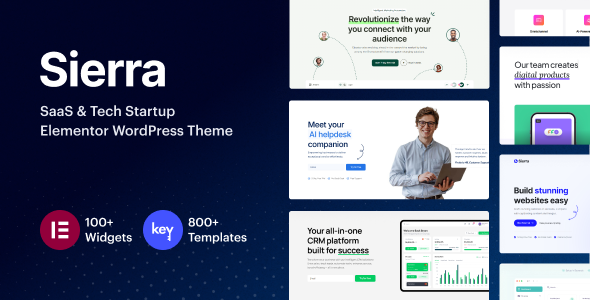
SaaS and tech startups need a site that can launch quickly, explain complex products clearly, and keep evolving as your offer grows. Sierra is a WordPress theme built specifically for that kind of workload, with Elementor at its core, WooCommerce support, and a very large library of templates and widgets aimed at digital products, apps, and subscription services.
You work with live drag and drop rather than code, so you can move from idea to functional landing page or full site in a short time. The theme ships with more than a dozen starter websites, a large collection of inner pages, and hundreds of template blocks, all tuned for SaaS, software, and tech use cases. With 3,984 sales and development led by Key-Design, a Power Elite author, Sierra targets long term use rather than quick one-off sites.
This overview walks through the main features, how they fit together, and what kinds of projects benefit most from the theme.
Sierra packs a lot into one package. At a high level you get:
The rest of the article breaks these down into practical terms.
Sierra’s design system targets clean, modern SaaS and tech aesthetics. The starter sites focus on landing pages and marketing sites that highlight product benefits, feature grids, pricing, and social proof. You can start from a full demo or build a custom layout with template blocks.
You get a mix of masonry and grid layouts for portfolios and blogs, plus multiple presets for listing and single views. For blogs, the theme offers classic, horizontal, and grid layouts, along with modern single post designs. For portfolios, you can work with filterable grids and masonry layouts, then pick from several single project layouts that tell the story behind each product or case study.
Visual details play a big role. Sierra supports:
These tools help you guide visitors through a narrative rather than just dropping blocks onto a page. For example, you can create a one-page product story that uses sticky content and section dividers to move a user from problem, to solution, to pricing without friction.
The template library is central to layout work. You can choose from hundreds of blocks for hero sections, feature grids, pricing sections, testimonials, FAQs, timelines, and more. Each block is fully customizable, adapts to your global typography and color settings, and comes in light and dark variants. Background options include solid colors, gradients, images, and videos, so you can align visual tone with your brand.
Sierra is built around Elementor’s live editor. You design in the front end, see changes immediately, and avoid back-and-forth between the editor and preview.
Key customization capabilities include:
Where Sierra goes beyond a typical Elementor theme is in its theme builder tooling:
The widget collection is extensive. Content widgets include accordions, advanced tabs, text rotators, timelines, blog posts listings, post lists, buttons, FAQs, icon boxes, and more. Business widgets focus on practical sections like business hours, client logo carousels, contact forms, pricing tables, pricing comparisons, menus, social icons, reviews, teams, and toggles.
Image and media widgets cover galleries, video and video galleries, audio players, hotspots, image accordions, image comparison, image swap, image masks, and hover effects. Infographic widgets include counters, countdowns, pie charts, and progress bars, which are useful for usage stats, growth metrics, or feature coverage.
WooCommerce widgets help you build product-focused sections with category lists, product carousels, and custom product lists that blend into landing pages rather than living only on shop templates.
All of these widgets share consistent styling controls, so once you set up brand colors, typography, and spacing standards, you can maintain a uniform look across every page.
For SaaS and tech startups, landing pages often carry the main workload. Sierra’s starter sites and template blocks are built with that in mind. You can:
Lead capture and conversion tools sit at the center of the experience. The popup and off-canvas builder can handle newsletter forms, early access forms, demo booking forms, or special offer banners. Form integration works with subscription and lead generation forms, making it easy to route data into your CRM or email tools.
The blog system supports list and grid layouts, with options for classic and modern single post designs. You can:
This makes Sierra suitable for content marketing that supports your product. Tutorials, changelogs, product updates, and thought leadership pieces fit naturally into the available layouts.
For portfolios, Sierra allows you to showcase case studies, implementations, or product modules:
Ecommerce features rely on WooCommerce. The theme includes around 12 shop page layouts and 8 single product templates, so you can match the store to your brand and product type. You also get:
This suits SaaS businesses that sell add-ons, physical devices, or one-time licenses alongside subscriptions.
Maintenance mode and coming soon mode help when you are rebranding or launching a new product. You can present a branded holding page, capture email addresses, and still work on the full site behind the scenes.
Sierra is built with performance and SEO in mind. The theme includes optimizations that aim for high PageSpeed and YSlow scores, focusing on both speed and smooth interactions.
Important performance features include:
SEO best practices are baked into the theme structure. You design with Elementor, but the markup is optimized and updated alongside Elementor’s own improvements. Recent updates have addressed issues with Elementor’s optimized markup feature, ensuring styles and interactions remain consistent.
Responsive design is not an afterthought. Advanced responsive options let you:
Retina readiness ensures icons and images stay sharp on high density displays, which is important for modern laptops, tablets, and phones.
On the technical side, Sierra targets current hosting standards. Recommended system requirements include PHP 7.4 or greater, modern MySQL or MariaDB versions, and WordPress-friendly limits for memory, file uploads, and execution time. These values are typical of most managed WordPress hosts and are not extreme, but they matter if you are running on older or limited environments.
Automatic updates simplify maintenance. When a new version becomes available, you see a notification in the WordPress dashboard and can apply it with a single click. The theme includes its own update system that pulls new versions from the developer’s servers and handles the file replacement process behind the scenes.
The changelog shows active development from the initial release in late 2023 through multiple releases in 2024 and 2025. These updates do more than fix bugs. They add features such as:
This pattern suggests you can expect continued refinement rather than a static theme.
If you target users in more than one language, Sierra’s multilanguage support is a strong point. The theme is translation ready and works with popular plugins:
You can translate posts, pages, menus, and widgets, then manage content in multiple languages from within WordPress. This enables localized marketing sites or region-specific product messaging without losing design consistency.
Google Maps integration appears in both widgets and layouts, so you can embed maps in contact pages, footers, or even mega menus. This helps agencies, coworking spaces, and hybrid SaaS businesses that still rely on physical locations.
Lottie integration lets you add lightweight vector animations that can make product illustrations or onboarding steps more engaging without heavy video files.
Social sharing buttons and social icon widgets help connect your site with your broader online presence. You can place these in headers, footers, sidebars, or individual sections as needed.
In real projects, the value of a theme comes from how quickly you can go from blank WordPress install to a site that supports your goals. Sierra focuses on that practical path.
One-click demo import lets you choose a starter site and load its pages, layouts, and blocks into your installation. You then replace placeholder copy and imagery with your own content. For many SaaS projects, this means you can launch a credible marketing site in days rather than weeks.
The theme’s structure works for several common scenarios:
CRM capabilities and the AI helpdesk companion features make Sierra useful when customer support and onboarding are central to your business. You can build support sections, knowledge base overviews, and contact flows into your site design, then tie them into your existing tools. The Popup and Off-Canvas Builder supports lead capture and contact flows that trigger before a user leaves or once they reach certain sections.
Elementor’s live editing keeps the learning curve manageable. Non-technical team members can adjust copy, swap images, and tweak layouts without risking the underlying structure. For designers and developers, the theme builder features, custom CSS support, and widget variety allow deeper customization.
Sierra sits among several WordPress themes aimed at startups and SaaS businesses, but it leans heavily into Elementor-based design systems and a large template library.
If you prefer a more stripped-down approach focused purely on lean startup pages, you might look at the StartUp WordPress theme. Compared to that style of theme, Sierra gives you more custom widgets, a deeper template library, and built-in CRM and AI helpdesk elements, which make sense if you plan to grow the site beyond a simple launch page.
For another Elementor-focused SaaS option, the BrightHub SaaS and tech startup theme targets similar audiences. Sierra distinguishes itself by its header, footer, mega menu, popup, and off-canvas builders that all run through Elementor, and by its very large template and widget collection aimed at fine control over content blocks.
If you work with more traditional SaaS marketing stacks or legacy projects, you may know themes like the Freemium SaaS WordPress theme. Sierra updates that concept with modern responsiveness, mobile-perfect templates, particle and parallax effects, and built-in multilingual support.
For teams that need a more classic corporate and portfolio look, a business-focused option such as the Mercedesa business and portfolio theme can be a better fit. Sierra, in contrast, leans into SaaS and tech visuals, animated interactions, and landing page structures tuned for digital products.
In short, Sierra makes the most sense if you want a future-friendly SaaS or tech site that relies on Elementor, needs WooCommerce, and benefits from rich template and widget libraries.
While this overview does not include specific user testimonials, Sierra provides tools to showcase your own customer feedback. Testimonials and reviews widgets let you feature customer quotes, ratings, and logos within landing pages, case studies, or pricing sections. Combined with portfolio and blog content, you can build a strong credibility layer around your product.
The theme’s adoption, reflected in 3,984 sales, indicates broad use in the WordPress ecosystem. More importantly, the changelog shows ongoing care. Recent versions have:
Support is available through a dedicated helpdesk on business days, Monday to Friday, typically with responses within about 24 hours. A regular license includes six months of premium support, which covers theme-related questions and troubleshooting. This is backed by extensive documentation and a help center that cover setup, customization, and usage for blogs, portfolios, and shops.
A community group gives you a place to connect with other users, share solutions, and see how others implement the theme. This can shorten your learning curve and provide real examples of what is possible with Sierra.
Sierra brings together an Elementor-first workflow, a deep template and widget library, and specialized tools for SaaS and tech startups. You can build landing pages, blogs, portfolios, and WooCommerce shops within one consistent system, while keeping control over design details like typography, color, and layout behavior on every device.
The theme suits you if:
With CRM capabilities, AI helpdesk companion features, multilingual support, and a track record of active development, Sierra offers a solid foundation for tech-focused WordPress sites that need to evolve over time. If you want a theme that can handle both your initial launch and later stages of growth without forcing a redesign, Sierra is built with that path in mind.
We are nothing without our users ! You can help us offer even more high quality content. Please share our page !
 MAFIASHARE
Sharing is caring
MAFIASHARE
Sharing is caring