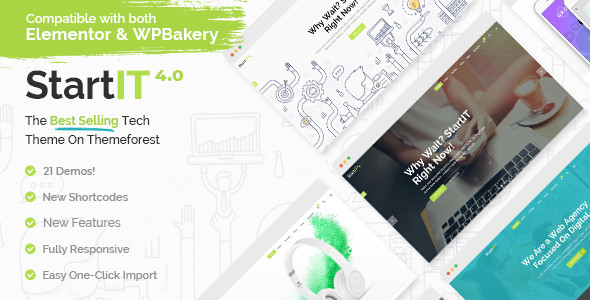
Startit is a WordPress theme designed for startups, SaaS products, software companies, and app landing pages. It focuses on helping you present a young tech business in a clear and visually structured way, without requiring coding knowledge.
You get more than 21 homepage layouts, portfolio and blog templates, a WooCommerce-ready shop, and tight integration with popular page builders. Combined with a wide range of shortcodes and design controls, Startit works as a flexible framework for launching or redesigning a tech-focused site.
This overview walks through the key features, how they fit real-world use cases, how the theme compares with similar options, and what you can realistically expect in daily use.
Startit’s visual structure centers on flexible layouts and strong control over page sections.
You can choose from 21 fully flexible homepage layouts tailored for:
Each homepage can mix sliders, hero sections, feature grids, testimonials, client logos, pricing blocks, and calls to action, all wired through shortcodes and page builder elements.
Parallax sections, video backgrounds, and full-height areas let you break the page into clear, story-driven slices: introduction, product explanation, social proof, pricing, and contact. Because the theme is fully responsive and retina ready, these sections stay legible and consistent across desktop, tablet, and mobile.
Startit gives you a high level of control over navigation and header behavior. You can choose between:
You can adjust header top and bottom areas, set different logos for normal, sticky, mobile, light, and dark header skins, and control visibility of the top bar on mobile. Anchor navigation lets you scroll smoothly to sections on single-page layouts, which is especially useful for app landing pages and one-page startup sites.
A customizable mega menu helps you organize complex navigation, such as multiple products, resources, and company sections, without overwhelming visitors.
Startit’s footer is flexible, with options for one to four columns and an “unfold” style. You get:
Built-in widgets include latest posts and a Twitter feed (the dedicated Twitter plugin has since been removed due to API changes, but the theme itself still lists a Twitter feed widget feature). You can place these in the header, sidebar, or footer to expose content, social feeds, and navigation shortcuts.
A core strength of Startit is its library of shortcodes and custom post types provided by the Select Core plugin.
You can use:
These elements help you build landing pages that explain your product, show it in context, and add trust signals through testimonials and client lists.
For content marketing and case studies, Startit includes:
For showcasing projects, features, or customer stories in a more visual way, you get:
You can mix these into landing pages or create dedicated portfolio sections for case studies, product modules, or implementation examples.
Typography is highly customizable:
Startit ships with several icon packs, including Font Awesome, Font Elegant, Ion Icons, Simple Line Icons, Linea Icons, and Dripicons. This variety makes it easier to keep icon styles consistent with your brand and use icons for lists, feature blocks, and call-to-action areas.
Startit is built to be approachable for non-developers while still supporting more advanced control.
The theme is compatible with Elementor and includes WPBakery Page Builder for WordPress. You can choose either:
This gives you drag-and-drop control over sections, columns, and elements. You can rearrange blocks, adjust spacing, and reuse templates across pages without touching code.
The theme’s admin interface exposes a large set of options:
You can define global defaults, then override them on individual pages when you need a different header style, background, or section layout.
One-click demo content import helps you start from a working layout instead of a blank page. This is useful if you want to mirror a particular homepage style and then replace text and media with your own.
Maintenance mode functionality lets you hide the live site behind a holding page while you build or adjust your layout, which is helpful for new product launches or rebrands.
Startit integrates with WooCommerce and supports a range of ecommerce use cases.
The theme has WooCommerce integration and regularly updated compatibility, including support for WooCommerce 10.x in recent versions. You can expect:
Quantity input fields, product page styling, and checkout/account pages have seen specific fixes in updates, showing ongoing attention to real-world shop behavior.
For a startup or SaaS business website, you can combine:
If you need a more traditional small business site rather than a tech-focused layout, you might also consider a dedicated small business theme like the Start it Up theme for small businesses, which focuses on templates such as “Our Team” and “Our Services.” For a more general corporate feel, you might also look at the Boxit clean and modern corporate WordPress theme. Startit, however, leans more toward tech startups, app companies, and SaaS products.
Performance and compatibility play a key role in whether a theme works well over time.
Startit uses smooth scrolling and smooth page transitions, with options to enable or disable them depending on your preference. Updates have improved how these transitions work alongside lightbox features in both Elementor and WPBakery galleries.
The theme has moved toward generating static CSS and JS files for performance, instead of relying on PHP-driven dynamic styles. This helps reduce overhead and improves loading times when configured correctly.
The theme is SEO-optimized, with attention to:
Social share functionality is built in, and updates have improved link generation and icon support, including the switch to the newer Twitter “X” icon via a font update.
The update log shows continuous maintenance from the initial release in 2015 through to 2025, covering:
Security has received specific attention as well, with improvements and fixes noted in multiple versions. Google Maps integration has been kept current with updated APIs and removal of deprecated methods.
Some newer versions require theme registration with a purchase code for enabling theme options, shortcodes, and custom post types on live servers, which you should factor into your deployment workflow.
Startit targets startups and tech businesses, but the underlying structure can fit several scenarios.
If you run a SaaS product, you can:
Anchor-based navigation and smooth scrolling help you build one-page experiences for campaigns, while dedicated inner pages support more detailed documentation or resource hubs.
The combination of 3D mobile showcases, video backgrounds, and app-focused hero layouts makes Startit suitable for mobile apps and desktop software. You can:
If you want to compare different app-focused frameworks, a more focused startup template such as the StartUp website framework for startups can serve as a point of reference, but Startit provides broader WordPress site coverage with full blog and shop integration. Another option for SaaS products and tech startups is the BrightHub theme, which also focuses on polished sites without touching code.
For early-stage startups or small agencies, you can:
If you want a more general corporate angle, the Stacked business and portfolio theme focuses on filterable portfolios and corporate layouts, while Startit leans toward modern tech companies and product-driven sites. For a broader business, finance, and consulting focus, consider the Consulting WordPress theme.
Startit’s WooCommerce integration supports:
You can design product pages that match your main site layout, and use portfolio and blog templates to support pre-sales content and onboarding materials.
The WordPress ecosystem offers many business and startup-focused themes. Startit sets itself apart through its emphasis on tech businesses, its large library of shortcodes, and long-term update history. Looking at a few related options helps put it in context.
Compared with these, Startit’s strengths lie in its startup-focused demo library, consistent visual language across sliders, portfolios, and blogs, and its long-running update track record that keeps it aligned with modern WordPress and WooCommerce versions.
The provided information lists “Testimonials” as a feature, indicating that Startit includes built-in ways to display customer quotes and success stories on your site. You can use these blocks to highlight user feedback, case studies, and endorsements in a structured way.
However, the data here does not include direct customer reviews or user testimonials about Startit itself. That means there is no verifiable information in this dataset about user satisfaction, performance in specific hosting environments, or long-term experiences with support.
What you can see is an emphasis on:
Combined with the steady update history and ongoing compatibility work, these points suggest that the theme’s authors invest in long-term support and learning resources. For your own implementation, the testimonial elements in the theme help you surface feedback from your own customers once your product or service is live.
Startit is a focused theme for startups, SaaS products, software companies, and app landing pages. It combines 21+ homepage layouts, strong page builder integration, and a deep set of shortcodes to help you build a site that explains your product, shows proof, and supports ongoing content.
You can:
If you want a more general corporate or small business theme, options like the Startup business/portfolio CMS theme or other business-oriented designs may fit different priorities. But if your main goal is to present a startup, SaaS, or app in a modern, content-rich way, Startit offers a mature, regularly updated framework that you can adapt to your own brand and product story.
We are nothing without our users ! You can help us offer even more high quality content. Please share our page !
 MAFIASHARE
Sharing is caring
MAFIASHARE
Sharing is caring